

Turn Vibe Code Into Visuals You Can Understand
It's like an X-ray into your code

Vibe coding is going to stand out as one of the biggest AI trends of 2025. Tools like Lovable feel like magic. Type into a no-code tool, chat back and forth, then ship it fast. There's nothing wrong with this approach, it gets you moving, gets you learning, gets you shipping.
But here's the problem: You end up with something that works, but you don't actually understand how it works. Your app becomes a black box, even to you. When something breaks (and it will), you're stuck poking around in the dark, hoping to stumble onto the solution.
That's where Mermaid diagrams and AI become your secret weapon. They give you x-ray vision into your app's logic, workflows, and structure, without requiring you to become a full-time engineer or spend weeks reverse-engineering your own code.
Mermaid You Say?
Mermaid is a diagramming tool that turns plain text (markdown) into visual diagrams. Think flowcharts, sequence diagrams, database schemas, all the visual stuff that usually requires expensive software and design skills.
No dragging boxes around in some expensive diagramming tool. No fighting with alignment or worrying about making things look pretty. You just prompt AI to write simple text that describes your process, and it automatically becomes a professional-looking diagram.
The best part, is that GenAI can create this for you with no bad image hallucinations. This matters because text is easy to edit, version control, and share. Change one line, and the whole diagram updates. Copy and paste it anywhere. Store it right next to your code. It's diagrams for people who'd rather write than draw.
The Four-Step Process
Step 1: Give AI your code (or describe the process)
You don't need to be technical about this. Just grab whatever you have and throw it at AI with a simple prompt:
"Generate a Mermaid flowchart showing what happens in this login function: [paste code]"
Or if you don't have code:
"Make a sequence diagram for my checkout flow: user adds to cart → system saves order → payment processor → confirmation email."
Or if you’re using a tool like Claude Code, you don’t even need to provide the code since it can pick it up in context.
Step 2: Let AI translate it into a diagram
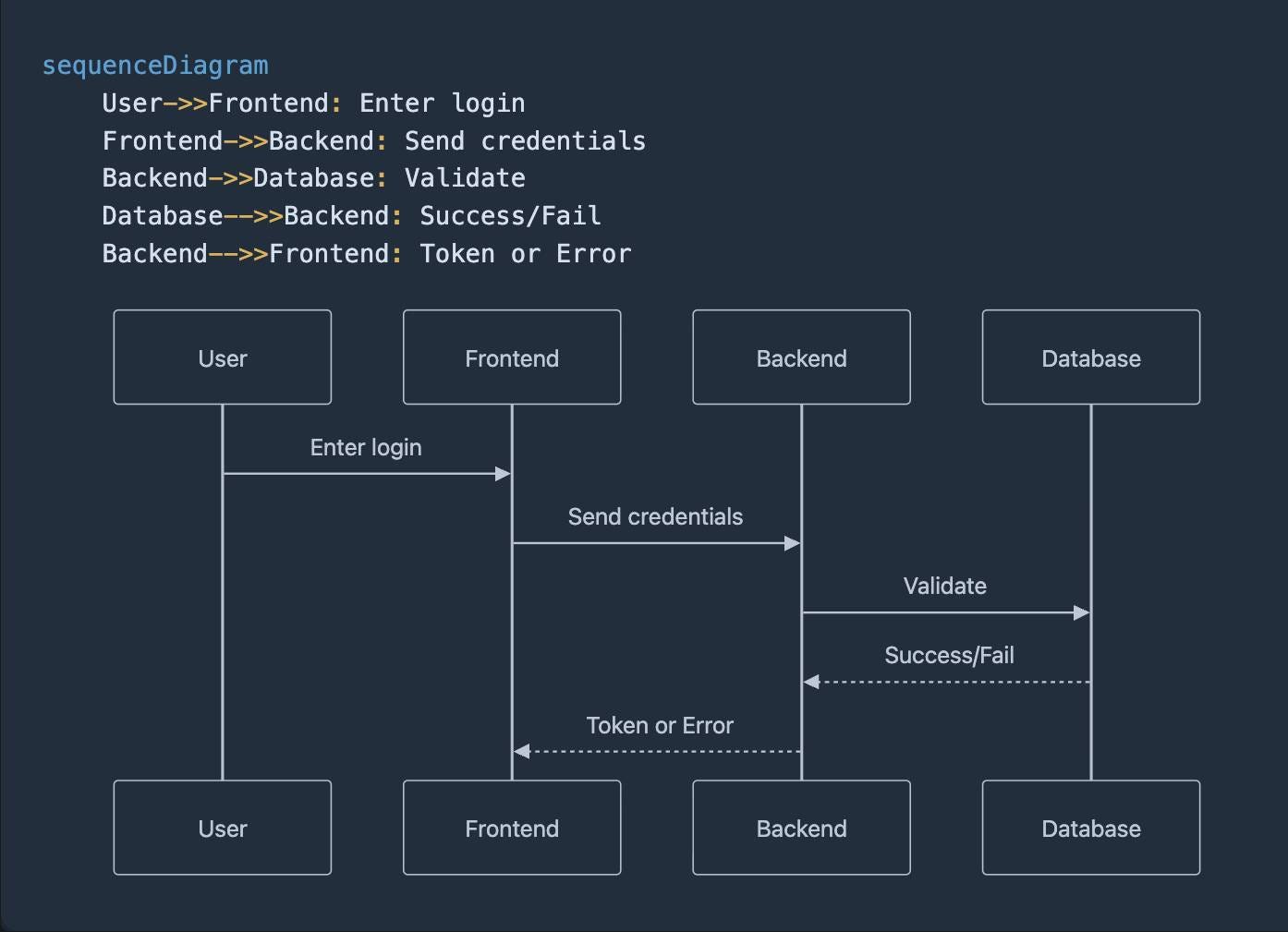
AI does the heavy lifting and gives you clean, readable diagram code like this:
sequenceDiagram
    User->>Frontend: Enter login
    Frontend->>Backend: Send credentials
    Backend->>Database: Validate
    Database-->>Backend: Success/Fail
    Backend-->>Frontend: Token or Error
Step 3: Render it
Now comes the magic. You can see your diagram anywhere:
GitHub: Paste into a README and it renders automatically
VS Code: Use the "Markdown Preview Mermaid Support" extension
Notion/Obsidian: Drop it into a mermaid code block
Step 4: Rinse and repeat
Once you see how powerful this is, you'll want to diagram everything. Try it for your database structure (ERD diagrams), your signup flow, your API calls, or any function that makes you scratch your head and wonder "wait, what does this actually do?"
Why This Changes Everything
Clarity replaces guesswork. The fog lifts when you can see your app's actual behavior mapped out in front of you. No more detective work trying to figure out why users stumble at step four or why that same bug keeps returning.
Conversations get easier. Hand someone a diagram instead of launching into a rambling explanation of your tangled workflow. "Here's what I built, here's where it breaks" beats twenty minutes of confused back-and-forth every time.
Problems surface early. Spread the whole system out where you can see it, and those lurking edge cases start waving their hands. The "oh wait, what if..." moments that would have ambushed you at 2 AM next Tuesday become obvious today, while you can still do something about them.
The Bottom Line
Vibe coding gets you started, and that's valuable. But understanding your system is how you scale, how you debug, and how you grow beyond the scrappy MVP stage.
Mermaid diagrams plus AI give you the x-ray vision you've been missing. Your future self (and your users) will thank you.